class: center, middle # A Sample Session in R ## Data Analysis with R and Python ### Deepayan Sarkar <h1 onclick='document.documentElement.requestFullscreen();' style='cursor: pointer;'> <svg xmlns='http://www.w3.org/2000/svg' width='16' height='16' fill='currentColor' class='bi bi-arrows-fullscreen' viewBox='0 0 16 16'> <path fill-rule='evenodd' d='M5.828 10.172a.5.5 0 0 0-.707 0l-4.096 4.096V11.5a.5.5 0 0 0-1 0v3.975a.5.5 0 0 0 .5.5H4.5a.5.5 0 0 0 0-1H1.732l4.096-4.096a.5.5 0 0 0 0-.707zm4.344 0a.5.5 0 0 1 .707 0l4.096 4.096V11.5a.5.5 0 1 1 1 0v3.975a.5.5 0 0 1-.5.5H11.5a.5.5 0 0 1 0-1h2.768l-4.096-4.096a.5.5 0 0 1 0-.707zm0-4.344a.5.5 0 0 0 .707 0l4.096-4.096V4.5a.5.5 0 1 0 1 0V.525a.5.5 0 0 0-.5-.5H11.5a.5.5 0 0 0 0 1h2.768l-4.096 4.096a.5.5 0 0 0 0 .707zm-4.344 0a.5.5 0 0 1-.707 0L1.025 1.732V4.5a.5.5 0 0 1-1 0V.525a.5.5 0 0 1 .5-.5H4.5a.5.5 0 0 1 0 1H1.732l4.096 4.096a.5.5 0 0 1 0 .707z'/> </svg> </h1> --- # Starting and Interacting with R * R is typically used interactively * When we start R, the command window (or console) displays a prompt, typically `>` * We use R by entering an expression to be evaluated * R evaluates the expression and prints the result ``` r 1 + 2 ``` ``` [1] 3 ``` * It then provides a new prompt and waits for more input * To **quit** R, you can use the command `q()` <div> $$ \newcommand{\sub}{_} $$ </div> --- # Infix and Prefix Notation * R uses **infix** notation for standard arithmetic operations, e.g., ```r 1 + 2 ``` -- * The corresponding **prefix** notation would look something like ``` + 1 2 ``` -- * This is actually what R does internally, using _function notation_ ``` r `+`(1, 2) ``` ``` [1] 3 ``` * In general, R expressions are typically function calls of the form `f(a, b)` --- layout: true # Basic principles: Data types --- * R can handle many different kinds of data * Basic classification: *simple data* and *compound data* * **Simple Data** includes: * Numbers (numeric values, including integers and floating-point numbers): ```r 1 # an integer -3.14 # a floating point number ``` -- * Logical values: ```r TRUE # true FALSE # false (or T and F shortcuts) ``` -- * Strings (enclosed in single or double quotes): ```r "This is a string 1 2 3 4" ``` --- * **Compound Data** primarily consists of * **vectors** : ordered collections of elements of the same type * **lists** : ordered collections with elements of possibly different types -- * We commonly define compound data using the concatenate function `c()`: ``` r c(1, 2, 3) ``` ``` [1] 1 2 3 ``` --- * We can also have **Symbols** which are used for naming variables or functions: ```r x gdp.data this_is_a_symbol ``` --- layout: false # The REPL * An R session involves interaction between the user and the console (_listener_) * When we enter an expression, the listener passes it to the _evaluator_ -- * Basic rule: * Everything is evaluated * The results are (usually) printed * Once done, listener goes back to listening -- <br/> .center[ This is known as the __Read-Eval-Print-Loop__ or __REPL__ ] --- layout: true # Evaluation rules --- * Numbers and strings evaluate to themselves: ``` r 10 ``` ``` [1] 10 ``` ``` r "Hello" ``` ``` [1] "Hello" ``` --- * Expressions can involve _functions_ ``` r sqrt(10) ``` ``` [1] 3.162278 ``` ``` r nchar("Hello") ``` ``` [1] 5 ``` -- * Functions are applied using parentheses -- * Function name precedes arguments, mirroring **prefix** notation * For example ` min(x, y) ` instead of ` min x y ` * Parentheses needed when number of arguments of functions are unknown * Compare ` min(pi, sqrt(10)) ` and ` min pi sqrt 10 ` --- * Evaluation can be **suppressed** by _quoting_ an expression ``` r quote(min(pi, sqrt(10))) ``` ``` min(pi, sqrt(10)) ``` -- * This turns out to be a very interesting feature that we will return to later * Python does **not** have a similar feature (R and Python are otherwise very similar) --- layout: false class: center middle # Elementary Statistical Operations Fundamental numerical and graphical statistical operations in R --- layout: true # Example dataset: World Social Indicators, 1960 --- .scrollable500[ country|gnppc|pctlit_adult|highered100k :-------|----:|-----------:|-----------: Nepal|45|5|56 Afghanistan|50|2.5|12 Laos|50|17.5|4 Ethiopia|55|2.5|5 Burma|57|47.5|63 Libya|60|13|49 Sudan|60|9|34 Tanganyika|61|7.5|9 Uganda|64|27.5|14 Pakistan|70|13|165 China|73|47.5|69 India|73|19.3|220 South Vietnam|76|17.5|83 Nigeria|78|10|4 Kenya|87|22.5|5 Madagascar|88|33.5|21 Congo|92|37.5|4 Thailand|96|68|251 Bolivia|99|32.1|166 Cambodia|99|17.5|18 ] --- * Data from a small subset of countries * All have relatively low per capita GDP * Variables * `gnppc` : per capita GNP (around 1957), * `pctlit_adult` : adult literacy (%) around 1960 * `highered100k` : enrollment in higher education per 100,000 population --- layout: true # Simple univariate calculations --- * Simplest statistical data: univariate * Usually consists of groups of numbers * We first consider only the data on enrolment in higher education, which are ``` 56 12 4 5 63 49 34 9 14 165 69 220 83 4 5 21 4 251 166 18 ``` -- * In R, we represent this data as a vector using `c()` (combine): ``` r c(56, 12, 4, 5, 63, 49, 34, 9, 14, 165, 69, 220, 83, 4, 5, 21, 4, 251, 166, 18) ``` ``` [1] 56 12 4 5 63 49 34 9 14 165 69 220 83 4 5 21 4 251 166 [20] 18 ``` --- * The `mean()` function computes the average (**arithmetic mean**) of a vector of numbers. ``` r mean(c(56, 12, 4, 5, 63, 49, 34, 9, 14, 165, 69, 220, 83, 4, 5, 21, 4, 251, 166, 18)) ``` ``` [1] 62.6 ``` -- * The **median** of these numbers can be calculated using `median()`: ``` r median(c(56, 12, 4, 5, 63, 49, 34, 9, 14, 165, 69, 220, 83, 4, 5, 21, 4, 251, 166, 18)) ``` ``` [1] 27.5 ``` --- * This requires retyping the data every time * We can avoid this by assigning it a _name_ to reference by * Done using the assignment operator `<-` or the (mostly) equivalent `=` operator. ``` r higher.educ <- c(56, 12, 4, 5, 63, 49, 34, 9, 14, 165, 69, 220, 83, 4, 5, 21, 4, 251, 166, 18) ``` * This is known as a **variable assignment** --- * The symbol `higher.educ` now holds the vector of 20 numbers * If we evaluate the symbol, R returns its value. ``` r higher.educ ``` ``` [1] 56 12 4 5 63 49 34 9 14 165 69 220 83 4 5 21 4 251 166 [20] 18 ``` --- * We can easily compute numerical descriptive statistics. ``` r mean(higher.educ) ``` ``` [1] 62.6 ``` ``` r median(higher.educ) ``` ``` [1] 27.5 ``` ``` r sd(higher.educ) # Standard deviation ``` ``` [1] 76.57222 ``` ``` r IQR(higher.educ) # Interquartile range ``` ``` [1] 64.5 ``` --- layout: true # Vectorized arithmetic --- * R also supports **elementwise arithmetic operations** on vectors * For example, we can add 1 to each value using ``` r 1 + higher.educ ``` ``` [1] 57 13 5 6 64 50 35 10 15 166 70 221 84 5 6 22 5 252 167 [20] 19 ``` * We can calculate the natural logarithms of the values ``` r log(higher.educ) ``` ``` [1] 4.025352 2.484907 1.386294 1.609438 4.143135 3.891820 3.526361 2.197225 [9] 2.639057 5.105945 4.234107 5.393628 4.418841 1.386294 1.609438 3.044522 [17] 1.386294 5.525453 5.111988 2.890372 ``` --- * Functions can be nested, as we have been doing ``` r mean(log(higher.educ)) ``` ``` [1] 3.300523 ``` ``` r median(log(higher.educ)) ``` ``` [1] 3.285441 ``` --- * Expressions with simple nested functions can be written in _pipeline_ notation * Sometimes easier to follow because order of application is left-to-right (like _postfix_ notation) ``` r higher.educ |> log() |> mean() ``` ``` [1] 3.300523 ``` ``` r higher.educ |> log() |> median() ``` ``` [1] 3.285441 ``` -- ``` r higher.educ |> log() |> mean() |> exp() ``` ``` [1] 27.12684 ``` ``` r higher.educ |> log() |> median() |> exp() ``` ``` [1] 26.72078 ``` --- layout: false # Arithmetic Mean, Geometric Mean, and Median * What does the following tell us about the data? ``` r higher.educ |> mean() # arithmetic mean ``` ``` [1] 62.6 ``` ``` r higher.educ |> log() |> mean() |> exp() # geometric mean ``` ``` [1] 27.12684 ``` ``` r higher.educ |> median() # median ``` ``` [1] 27.5 ``` --- layout: false # Another dataset: Average monthly PM 2.5 levels * Recorded at an air quality monitoring station in R.K.Puram (Delhi) * Over a 3-year period, from January 2021 to December 2023. ``` r pm25 <- c(288, 223, 167, 156, 126, 120, 102, 106, 83, 114, 259, 282, 234, 183, 174, 176, 160, 139, 102, 99, 110, 173, 245, 250, 260, 190, 150, 164, 161, 144, 115, 138, 123, 182, 323, 280) ``` --- # Some numerical summaries ``` r mean(pm25) ``` ``` [1] 175.0278 ``` ``` r median(pm25) ``` ``` [1] 162.5 ``` ``` r sd(pm25) ``` ``` [1] 63.83796 ``` ``` r IQR(pm25) ``` ``` [1] 103.5 ``` -- * Graphical summaries give better idea of distribution --- # Histogram * The function `hist()` draws a histogram of the data ``` r hist(pm25) # Produces a histogram plot ```  --- # Five-Number Summary * Standard quartiles + extreme values are useful to judge symmetry * Useful to compare transformations ``` r fivenum(pm25) ``` ``` [1] 83.0 121.5 162.5 228.5 323.0 ``` ``` r fivenum(sqrt(pm25)) ``` ``` [1] 9.110434 11.022494 12.747413 15.115122 17.972201 ``` ``` r fivenum(log(pm25)) ``` ``` [1] 4.418841 4.799838 5.090635 5.431246 5.777652 ``` --- # Box-and-Whisker Plot ``` r par(mfrow = c(1, 3)) boxplot(pm25, main = "PM25") boxplot(sqrt(pm25), main = "sqrt(PM25)") boxplot(log(pm25), main = "log(PM25)") ```  --- layout: true # Time Series Plots --- * We often plot observations against time (or the order in which they were obtained) * Helps to convey serial correlation or trend -- * The `plot()` function creates a scatterplot of two variables * To use it, we need a sequence of integers for the time variable --- * Useful function that generates a sequence: `seq()` or the shorthand `:` operator ``` r time <- 0:35 plot(time, pm25) ```  --- * It is common to connect points by lines, using the `type` argument, to emphasize the trend ``` r plot(time, pm25, type = "o") # "o" stands for 'overlay' ```  --- layout: true # Scatter plots --- * General scatter plots show points with coordinates given by two variables * Very useful for examining the relationship between two numerical variables -- * Recall: `higher.educ` from social indicators data * Additionally define the `adult_lit` variable to contain corresponding adult literacy (%). ``` r adult.lit <- c(5, 2.5, 17.5, 2.5, 47.5, 13, 9, 7.5, 27.5, 13, 47.5, 19.3, 17.5, 10, 22.5, 33.5, 37.5, 68, 32.1, 17.5) ``` --- * Scatter plot of `higher.educ` against `adult.lit` ``` r plot(adult.lit, higher.educ) ```  --- layout: true # Plotting Functions --- * Sometimes we are interested in plotting functions; e.g., plot $\sin(x)$ from $-\pi$ to $+\pi$ ``` r x_points <- seq(-pi, pi, length.out = 50) # equally spaced grid plot(x_points, sin(x_points), type = "l") ```  --- * It is also possible to plot functions (of one argument) directly ``` r plot(sin, from = -2 * pi, to = 2 * pi) ```  --- We can alse define a new function to plot as follows (more details later). ``` r f <- function(x) { 2 * x + 3 * x^2 - x^3 } plot(f, from = -10, to = 10) ```  --- layout: true # Example: Loss Function --- * The mean and median can be viewed as solutions that minimize a _loss function_ * Sample mean of $X\sub{1}, X\sub{2}, \dotsc, X\sub{n}$: $$ \arg \min\sub{\theta} \sum\limits\sub{i=1}^n (X\sub{i} - \theta)^2 $$ * Sample median of $X\sub{1}, X\sub{2}, \dotsc, X\sub{n}$: $$ \arg \min\sub{\theta} \sum\limits\sub{i=1}^n \lvert X\sub{i} - \theta \rvert $$ --- * The mean and median can be viewed as solutions that minimize a _loss function_ * Sample mean of $X\sub{1}, X\sub{2}, \dotsc, X\sub{n}$: $$ \arg \min\sub{\theta} L\sub{1}(\theta) \ \text{ where } L\sub{1}(\theta) = \sum\limits\sub{i=1}^n (X\sub{i} - \theta)^2 $$ * Sample median of $X\sub{1}, X\sub{2}, \dotsc, X\sub{n}$: $$ \arg \min\sub{\theta} L\sub{2}(\theta) \ \text{ where } L\sub{2}(\theta) = \sum\limits\sub{i=1}^n \lvert X\sub{i} - \theta \rvert $$ * What do the function $L\sub{1}$ and $L\sub{2}$ look like? --- * How can we define $L\sub{1}$? -- ``` r SSD <- function(theta) { S <- 0 n <- length(higher.educ) for (i in 1:n) { # for loop S <- S + (higher.educ[i] - theta)^2 # indexing, scope } S # value returned by function } ``` -- * Useful approach in general, but **not** recommended in R --- * Implementation using vectorization ``` r SSD <- function(theta) { dev <- higher.educ - theta sum(dev * dev) } ``` -- * Uses the fact that `-` and `*` operate elementwise on vectors * True for most mathematical functions as well --- * How can we plot `SSD`? -- ``` r theta_vals <- seq(0, 100, length.out = 201) plot(theta_vals, SSD(theta_vals), type = "l") ``` ``` Warning in higher.educ - theta: longer object length is not a multiple of shorter object length ``` ``` Error in xy.coords(x, y, xlabel, ylabel, log): 'x' and 'y' lengths differ ``` * Can you guess _why_ this fails? --- * The function `SSD()` is not _vectorized_ * In such cases, we cannot avoid a for loop ``` r SSD_vals1 <- numeric(100) # numeric array (vector) for (i in 1:100) { SSD_vals1[i] <- SSD(theta_vals[i]) } ``` -- * But this is a special kind of for loop known as _mapping_ * Here we _apply_ the same function on each element of a list * There is a function called `sapply()` which makes this very easy ``` r SSD_vals2 <- sapply(theta_vals, SSD) # evaluates SSD(x) for each x in theta_vals ``` --- ``` r plot(theta_vals, SSD_vals2, type = "l") ```  --- ``` r SAD <- function(theta) { dev <- higher.educ - theta sum(abs(dev)) } SAD_vals <- sapply(theta_vals, SAD) ``` --- ``` r plot(theta_vals, SAD_vals, type = "l") ```  --- layout: false class: center middle # Generating and Modifying Data Generating systematic and random data, modifying existing data --- # Generating Random Data (Simulation) * R provides functions for generating pseudo-random numbers * `runif(n)` generates `n` Uniform random variables ``` r runif(10) ``` ``` [1] 0.07259208 0.14267739 0.72486748 0.74550802 0.71689711 0.23798783 [7] 0.83719473 0.27428634 0.22583416 0.40005080 ``` * `rnorm(n)` generates `n` Standard Normal random variables. ``` r runif(25) ``` ``` [1] 0.48796856 0.57516783 0.91291972 0.70064571 0.61872201 0.12061300 [7] 0.51853375 0.96003093 0.69178571 0.75371220 0.55197013 0.66351545 [13] 0.60407731 0.43477146 0.69217189 0.55692986 0.81196480 0.12442570 [19] 0.05052460 0.12614908 0.19650873 0.11840920 0.07949956 0.64513184 [25] 0.01171745 ``` --- layout: true # Generating Systematic Data --- * We have seen `seq(start, end)` (or `start:end`) for equally spaced integer sequences ``` r seq(10, 19.5) ``` ``` [1] 10 11 12 13 14 15 16 17 18 19 ``` ``` r 1:pi ``` ``` [1] 1 2 3 ``` * Also `seq(a, b, length.out = n)` for general equally spaced sequences ``` r seq(1, pi, length.out = 10) ``` ``` [1] 1.000000 1.237955 1.475909 1.713864 1.951819 2.189774 2.427728 2.665683 [9] 2.903638 3.141593 ``` --- * The `rep()` function is useful for generating sequences with specific patterns * If we want to repeat a sequence: ``` r rep(c(1, 2, 3), 2) ``` ``` [1] 1 2 3 1 2 3 ``` * If we want to repeat each element a specified number of times: ``` r rep(c(1, 2, 3), times = c(3, 2, 1)) ``` ``` [1] 1 1 1 2 2 3 ``` --- layout: true # Forming Subsets and Deleting Cases --- * R uses bracket indexing `[]` to select elements from a vector or list * An important difference is that **R uses 1-based indexing**, and not 0-based indexing -- * Suppose we define a vector `x`: ``` r x <- c(3, 7, 5, 9, 12, 3, 14, 2) ``` * To retrieve the second element (index 2), we can use ``` r x[[2]] ``` ``` [1] 7 ``` ``` r x[2] ``` ``` [1] 7 ``` --- * To retrieve a _group_ of elements, we must use the second form, with a vector as index: ``` r x[c(1, 3)] ``` ``` [1] 3 5 ``` -- * To exclude elements, we use negative indices * To exclude the 3rd element: ``` r x[-3] ``` ``` [1] 3 7 9 12 3 14 2 ``` --- * We can also use **logical indexing** * To select all elements of `x` that are greater than 3: ``` r x[x > 3] ``` ``` [1] 7 5 9 12 14 ``` --- layout: false # Combining Several Lists * To combine several short vectors into a single longer vector, use `c()`: ``` r z1 <- c(1, 2, 3) z2 <- c(4) z3 <- c(5, 6, 7, 8) c(z1, z2, z3) ``` ``` [1] 1 2 3 4 5 6 7 8 ``` --- # Modifying Data: Replace values in existing vector * R uses subsetting combined with assignment * To change the `12` (the 5th element) in `x` to `11`: ``` r x ``` ``` [1] 3 7 5 9 12 3 14 2 ``` ``` r x[5] <- 11 x ``` ``` [1] 3 7 5 9 11 3 14 2 ``` -- * To change elements 1 and 3 to `15` and `16`: ``` r x[c(1, 3)] <- c(15, 16) x ``` ``` [1] 15 7 16 9 11 3 14 2 ``` --- # Reference versus copy * R copies vectors upon modification (does not modify in-place). For example: ``` r x ``` ``` [1] 15 7 16 9 11 3 14 2 ``` ``` r y <- x # y is a copy x[3] <- 100 x ``` ``` [1] 15 7 100 9 11 3 14 2 ``` ``` r y ``` ``` [1] 15 7 16 9 11 3 14 2 ``` * This behavior (implicit copying on modification) simplifies many tasks -- * Python does **not** copy implicitly in such situations * If required, copies must be made explicitly --- layout: false class: center middle # Useful Features Interacting with the R environment --- # Getting Help * Online help is available for most R functions * You can use the `?` operator followed by the function name, or the `help()` function ```r ?median help("median") ``` -- * You may not always know the exact function name beforehand * You can still use the `??` operator to search the documentation for keywords ```r ??normal ``` --- # Listing and Undefining Variables * To find out which variables we have defined in the current session: ``` r ls() ``` ``` [1] "adult.lit" "f" "higher.educ" "i" "pm25" [6] "SAD" "SAD_vals" "SSD" "SSD_vals1" "SSD_vals2" [11] "theta_vals" "time" "x" "x_points" "y" [16] "z1" "z2" "z3" ``` * To remove a variable to free up memory / clean up your workspace: ``` r rm(theta_vals, SSD_vals1, SSD_vals2, SSD) ls() ``` ``` [1] "adult.lit" "f" "higher.educ" "i" "pm25" [6] "SAD" "SAD_vals" "time" "x" "x_points" [11] "y" "z1" "z2" "z3" ``` --- # Saving Your Work * R provides mechanisms to save variables and record sessions. * To save variables for later use: ```r save(higher.educ, pm25, file = "examples.rda") ``` * This saves the specified variables to a file in a special binary format * Can be reloaded later in a different R session using `load("examples.rda")` --- # Loading files * Data files saved in R (using `save()`) can be read in using `load()` ```r load("examples.rda") ``` -- * R code can also be saved in a file (typically with extension `.R`) * We can run such a script, as a series of commands, using ```r source("/path/to/script.R") ``` -- * Good practice: Open an "R Script" to write / edit code instead of prompt * Saving this file keeps a record of what you have done --- # Importing data stored in other formats * Small datasets can be typed in at the R console to illustrate basic usage * Real world datasets are too large for this to be feasible -- * Typically distributed in a variety of formats * Easiest to import: text formats such as * CSV (comma-separated values) * JSON (JavaScript Object Notation) -- * Often distributed in proprietary or specialized formats meant for specific software: * `.xls` or `.xlsx` files exported by Microsoft Excel * `.xpt` files exported by SAS * `.sav` files exported by SPSS * `.dta` files exported by Stata. --- # Importing data stored in proprietary formats * Not always guaranteed that R will be able to read data from such files * But most common formats are supported (through add-on packages) * See [R Data Import/Export](https://cran.isid.ac.in/doc/manuals/r-devel/R-data.html) manual * Also covers interacting with data stored in Database Management Systens (useful for large datasets) -- * Most data import methods will import datasets as _data frames_ * Data frames basically combine multiple columns in a single container --- layout: true # Data Frames --- * Can be constructed explicitly using the `data.frame()` function * Example: combine `higher.educ` and `adult.lit` along with country names ``` r dsocial <- data.frame(country = c("Nepal", "Afghanistan", "Laos", "Ethiopia", "Burma", "Libya", "Sudan", "Tanganyika", "Uganda", "Pakistan", "China", "India", "South Vietnam", "Nigeria", "Kenya", "Madagascar", "Congo", "Thailand", "Bolivia", "Cambodia"), hedu = higher.educ, adlit = adult.lit) ``` --- * `dsocial` is now like a matrix / spreadsheet .scrollable500[ ``` r dsocial ``` ``` country hedu adlit 1 Nepal 56 5.0 2 Afghanistan 12 2.5 3 Laos 4 17.5 4 Ethiopia 5 2.5 5 Burma 63 47.5 6 Libya 49 13.0 7 Sudan 34 9.0 8 Tanganyika 9 7.5 9 Uganda 14 27.5 10 Pakistan 165 13.0 11 China 69 47.5 12 India 220 19.3 13 South Vietnam 83 17.5 14 Nigeria 4 10.0 15 Kenya 5 22.5 16 Madagascar 21 33.5 17 Congo 4 37.5 18 Thailand 251 68.0 19 Bolivia 166 32.1 20 Cambodia 18 17.5 ``` ] --- * Individual "columns" can be extracted using the `$` operator ``` r dsocial$country ``` ``` [1] "Nepal" "Afghanistan" "Laos" "Ethiopia" [5] "Burma" "Libya" "Sudan" "Tanganyika" [9] "Uganda" "Pakistan" "China" "India" [13] "South Vietnam" "Nigeria" "Kenya" "Madagascar" [17] "Congo" "Thailand" "Bolivia" "Cambodia" ``` ``` r dsocial$adlit ``` ``` [1] 5.0 2.5 17.5 2.5 47.5 13.0 9.0 7.5 27.5 13.0 47.5 19.3 17.5 10.0 22.5 [16] 33.5 37.5 68.0 32.1 17.5 ``` ``` r mean(dsocial$adlit) ``` ``` [1] 22.52 ``` --- * Can also be imported from file ``` r social_indicators <- read.csv("https://deepayan.github.io/BSDS/2026-01-DARP/slides/data/social-indicators-1964.csv", comment.char = "#") head(social_indicators) ``` ``` Country GNP.per.Capita Percent.Urban Percent.Adult.Literacy 1 Nepal 45 4.4 5.0 2 Afghanistan 50 7.5 2.5 3 Laos 50 4.0 17.5 4 Togo 50 4.5 7.5 5 Ethiopia 55 1.7 2.5 6 Burma 57 10.0 47.5 Higher.Ed.per.100000 Inhabitants.per.Physician Radios.per.1000 1 56 72000 NA 2 12 41000 1.7 3 4 100000 8.0 4 NA 58000 4.3 5 5 117000 4.5 6 63 15000 5.6 ``` --- layout: true # Plotting data in data frames --- * Possible using what we already know (but not recommended) ``` r plot(sqrt(dsocial$hedu), sqrt(dsocial$adlit)) ```  --- * Formula interface (used extensively in R) ``` r plot(sqrt(adlit) ~ sqrt(hedu), data = dsocial) ```  --- * Formula interface in __lattice__ add-on package ``` r lattice::xyplot(sqrt(adlit) ~ sqrt(hedu), data = dsocial) ``` 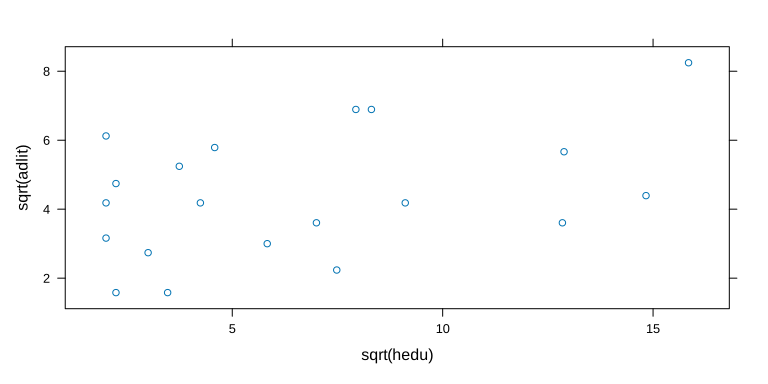 --- * Similar approach in __ggplot2__ add-on package ``` r ggplot2::ggplot(dsocial, mapping = ggplot2::aes(x = sqrt(hedu), y = sqrt(adlit))) + ggplot2::geom_point() ``` 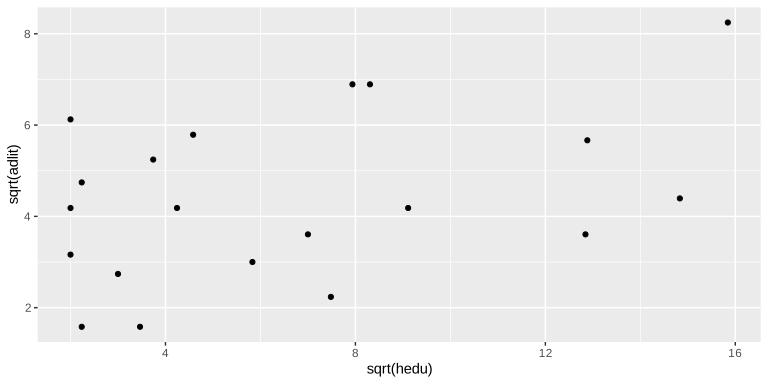 --- * Same plot for all countries in Original source: World handbook of political and social indicators, 1964 ``` r lattice::xyplot(sqrt(Percent.Adult.Literacy) ~ sqrt(Higher.Ed.per.100000), data = social_indicators) ``` 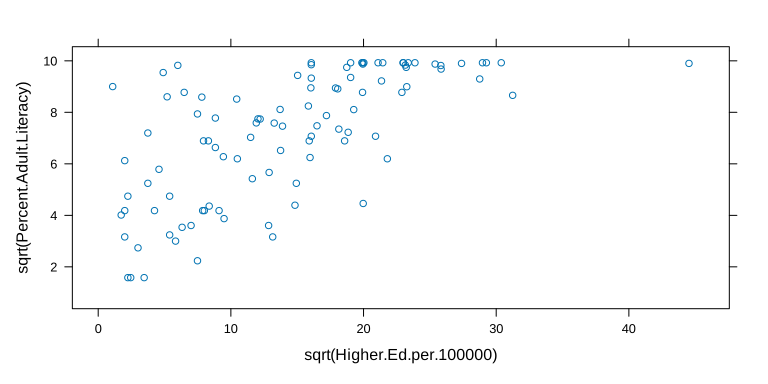 --- * Data in original units ``` r lattice::xyplot(Percent.Adult.Literacy ~ Higher.Ed.per.100000, data = social_indicators) ``` 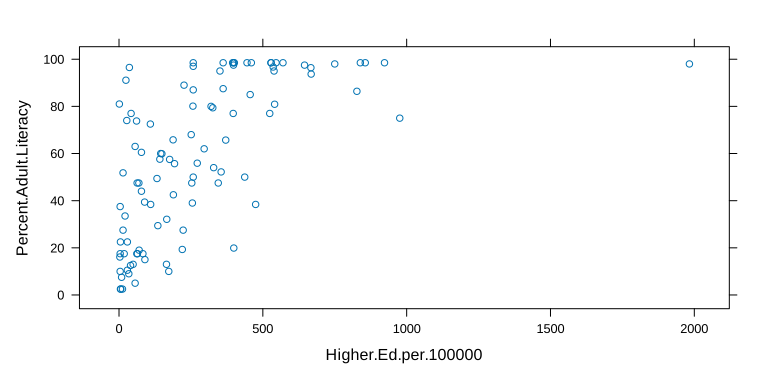 --- layout: false class: center middle # Questions?