class: center, middle # A Sample Session in Python ## Data Analysis with R and Python ### Deepayan Sarkar <h1 onclick='document.documentElement.requestFullscreen();' style='cursor: pointer;'> <svg xmlns='http://www.w3.org/2000/svg' width='16' height='16' fill='currentColor' class='bi bi-arrows-fullscreen' viewBox='0 0 16 16'> <path fill-rule='evenodd' d='M5.828 10.172a.5.5 0 0 0-.707 0l-4.096 4.096V11.5a.5.5 0 0 0-1 0v3.975a.5.5 0 0 0 .5.5H4.5a.5.5 0 0 0 0-1H1.732l4.096-4.096a.5.5 0 0 0 0-.707zm4.344 0a.5.5 0 0 1 .707 0l4.096 4.096V11.5a.5.5 0 1 1 1 0v3.975a.5.5 0 0 1-.5.5H11.5a.5.5 0 0 1 0-1h2.768l-4.096-4.096a.5.5 0 0 1 0-.707zm0-4.344a.5.5 0 0 0 .707 0l4.096-4.096V4.5a.5.5 0 1 0 1 0V.525a.5.5 0 0 0-.5-.5H11.5a.5.5 0 0 0 0 1h2.768l-4.096 4.096a.5.5 0 0 0 0 .707zm-4.344 0a.5.5 0 0 1-.707 0L1.025 1.732V4.5a.5.5 0 0 1-1 0V.525a.5.5 0 0 1 .5-.5H4.5a.5.5 0 0 1 0 1H1.732l4.096 4.096a.5.5 0 0 1 0 .707z'/> </svg> </h1> --- # Starting and Interacting with Python * Python is typically used interactively * When we start Python, the command window (or console) displays a prompt, typically `>>>` * We use Python by entering an expression to be evaluated * Python evaluates the expression and prints the result ``` python 1 + 2 ``` ``` 3 ``` * It then provides a new prompt and waits for more input * To **quit** Python, you can use the command `exit()` or `quit()` <div> $$ \newcommand{\sub}{_} $$ </div> --- # Similarities with R * User interface is very similar to R * Most concepts are transferable -- * We will focus on data analysis tools in Python * We will mostly replicate what we did in the previous R tutorial --- # Differences between R and Python * Python is a _general purpose_ programming language * R is a _domain specific_ programming language (designed for data analysis) -- * For our purposes, this means that we need some add-on packages to do data analysis in Python * _NumPy_ for vectorized numerical computations * _Matplotlib_ for plotting and visualization * _Pandas_ for data frames --- # Infix and Prefix Notation * Python uses **infix** notation for standard arithmetic operations, e.g., ```python 1 + 2 ``` -- * General Python expressions are typically function calls of the form `f(a, b)` ``` python len("Hello") ``` ``` 5 ``` --- layout: true # Basic principles: Data types --- * Python can handle many different kinds of data * Basic classification: *simple data* and *compound data* * **Simple Data** includes: * Numbers (numeric values, including integers and floating-point numbers): ```python 1 # an integer -3.14 # a floating point number ``` -- * Logical values: ```python True # true False # false (or T and F shortcuts) ``` -- * Strings (enclosed in single or double quotes): ```python "This is a string 1 2 3 4" ``` --- * We can also have **Symbols** which are used for naming variables or functions: ```python x gdp.data this_is_a_symbol ``` * Python uses `.` as a special separator in several contexts * So unlike in R, it cannot be used in variables names --- * **Compound Data** primarily consists of * **vectors** : ordered collections of elements of the same type * **lists** : ordered collections with elements of possibly different types -- * We can define compound data using the built-in list data structure `[ ... ]` ``` python [1, 2, 3] ``` ``` [1, 2, 3] ``` * However, these are **not** what we describe as _vectors_ with all elements of the same type ``` python [1, 'two', 3] ``` ``` [1, 'two', 3] ``` --- * The corresonding R data structure is a list ``` r list(1, 'two', 3) ``` ``` [[1]] [1] 1 [[2]] [1] "two" [[3]] [1] 3 ``` --- * Vectors (lists of same type) in Python need **NumPy Array** (`ndarray`) * We first need to import the NumPy library, conventionally as `np`: ``` python import numpy as np ``` -- ``` python np.array([1, 2, 7]) ``` ``` array([1, 2, 7]) ``` ``` python np.array([1, 'two', 7]) ``` ``` array(['1', 'two', '7'], dtype='<U21') ``` -- * This form of _coercion_ happens in R as well ``` r c(1, 'two', 3) ``` ``` [1] "1" "two" "3" ``` <!-- * Higher dimensional arrays (matrices) are also supported by NumPy --> --- layout: false # The REPL * A Python session involves interaction between the user and the console (_listener_) * When we enter an expression, the listener passes it to the _evaluator_ -- * Basic rule: * Everything is evaluated * The results are (usually) printed * Once done, listener goes back to listening * This is the same __Read-Eval-Print-Loop__ model used by R --- layout: true # Evaluation rules --- * Numbers and strings evaluate to themselves: ``` python 10 ``` ``` 10 ``` ``` python "Hello" ``` ``` 'Hello' ``` --- * Expressions can involve _functions_ * Functions are applied using parentheses, similar to R ``` python sqrt(10) # fails ``` ``` NameError: name 'sqrt' is not defined ``` -- ``` python np.sqrt(np.array([10, 100, 1000])) ``` ``` array([ 3.16227766, 10. , 31.6227766 ]) ``` --- * Why do we need a prefix for some functions but not others? ``` python len(np.array([10, 100, 1000])) ``` ``` 3 ``` ``` python np.mean(np.array([10, 100, 1000])) ``` ``` np.float64(370.0) ``` -- * Compare with R ``` r length(c(10, 100, 1000)) ``` ``` [1] 3 ``` ``` r mean(c(10, 100, 1000)) ``` ``` [1] 370 ``` --- * This is largely a matter of convention * In R, we can use namespace notation ``` r base::mean(c(10, 100, 1000)) ``` ``` [1] 370 ``` ``` r stats::median(c(10, 100, 1000)) ``` ``` [1] 100 ``` --- * Conversely in Python, we can bypass the package prefix by importing everything ```python from numpy import * mean(array([10, 100, 1000])) median(array([10, 100, 1000])) ``` * However, this is not usually done in Python --- layout: false class: center middle # Elementary Statistical Operations Fundamental numerical and graphical statistical operations in Python --- layout: true # Example dataset: World Social Indicators, 1960 --- .scrollable500[ country|gnppc|pctlit_adult|highered100k :-------|----:|-----------:|-----------: Nepal|45|5|56 Afghanistan|50|2.5|12 Laos|50|17.5|4 Ethiopia|55|2.5|5 Burma|57|47.5|63 Libya|60|13|49 Sudan|60|9|34 Tanganyika|61|7.5|9 Uganda|64|27.5|14 Pakistan|70|13|165 China|73|47.5|69 India|73|19.3|220 South Vietnam|76|17.5|83 Nigeria|78|10|4 Kenya|87|22.5|5 Madagascar|88|33.5|21 Congo|92|37.5|4 Thailand|96|68|251 Bolivia|99|32.1|166 Cambodia|99|17.5|18 ] --- * Data from a small subset of countries * All have relatively low per capita GDP * Variables * `gnppc` : per capita GNP (around 1957), * `pctlit_adult` : adult literacy (%) around 1960 * `highered100k` : enrollment in higher education per 100,000 population --- layout: true # Simple univariate calculations --- * Simplest statistical data: univariate * Usually consists of groups of numbers * We first consider only the data on enrolment in higher education, which are ``` 56 12 4 5 63 49 34 9 14 165 69 220 83 4 5 21 4 251 166 18 ``` -- * In Python, we represent this data as a NumPy array using the `np.array()` constructor: ``` python np.array([56, 12, 4, 5, 63, 49, 34, 9, 14, 165, 69, 220, 83, 4, 5, 21, 4, 251, 166, 18]) ``` ``` array([ 56, 12, 4, 5, 63, 49, 34, 9, 14, 165, 69, 220, 83, 4, 5, 21, 4, 251, 166, 18]) ``` --- * NumPy provides the `mean()` function to compute the average of a vector of numbers ``` python np.mean(np.array([56, 12, 4, 5, 63, 49, 34, 9, 14, 165, 69, 220, 83, 4, 5, 21, 4, 251, 166, 18])) ``` ``` np.float64(62.6) ``` -- * The **median** of these numbers can be calculated using `np.median()`: ``` python np.median(np.array([56, 12, 4, 5, 63, 49, 34, 9, 14, 165, 69, 220, 83, 4, 5, 21, 4, 251, 166, 18])) ``` ``` np.float64(27.5) ``` --- * To avoid re-typing the data, we can assigning it to a variable using the `=` operator. ``` python higher.educ = np.array([56, 12, 4, 5, 63, 49, 34, 9, 14, 165, 69, 220, 83, 4, 5, 21, 4, 251, 166, 18]) ``` ``` NameError: name 'higher' is not defined ``` * This will _not_ work because `.` is not allowed in variable names -- ``` python higher_educ = np.array([56, 12, 4, 5, 63, 49, 34, 9, 14, 165, 69, 220, 83, 4, 5, 21, 4, 251, 166, 18]) ``` * This is known as a **variable assignment** --- * The symbol `higher_educ` now holds the vector of 20 numbers * If we evaluate the symbol, Python returns its value. ``` python higher_educ ``` ``` array([ 56, 12, 4, 5, 63, 49, 34, 9, 14, 165, 69, 220, 83, 4, 5, 21, 4, 251, 166, 18]) ``` --- * We can easily compute numerical descriptive statistics. ``` python np.mean(higher_educ) ``` ``` np.float64(62.6) ``` ``` python np.median(higher_educ) ``` ``` np.float64(27.5) ``` ``` python np.std(higher_educ, ddof = 1) # Standard deviation (ddof=1 for sample SD) ``` ``` np.float64(76.5722225298306) ``` --- layout: true # Vectorized arithmetic --- * NumPy also supports **elementwise arithmetic operations** on vectors * For example, we can add 1 to each value using ``` python 1 + higher_educ ``` ``` array([ 57, 13, 5, 6, 64, 50, 35, 10, 15, 166, 70, 221, 84, 5, 6, 22, 5, 252, 167, 19]) ``` * We can calculate the natural logarithms of the values ``` python np.log(higher_educ) ``` ``` array([4.02535169, 2.48490665, 1.38629436, 1.60943791, 4.14313473, 3.8918203 , 3.52636052, 2.19722458, 2.63905733, 5.10594547, 4.2341065 , 5.39362755, 4.41884061, 1.38629436, 1.60943791, 3.04452244, 1.38629436, 5.52545294, 5.11198779, 2.89037176]) ``` --- * Functions can be nested, as we have been doing ``` python np.median(np.log(higher_educ)) ``` ``` np.float64(3.2854414811697925) ``` ``` python np.mean(np.log(higher_educ)) ``` ``` np.float64(3.3005234880287766) ``` --- layout: false # Arithmetic Mean, Geometric Mean, and Median ``` python np.mean(higher_educ) # arithmetic mean ``` ``` np.float64(62.6) ``` ``` python np.median(higher_educ) # median ``` ``` np.float64(27.5) ``` ``` python np.exp(np.mean(np.log(higher_educ))) # geometric mean ``` ``` np.float64(27.126835778179665) ``` --- layout: false # Another dataset: Average monthly PM 2.5 levels * Recorded at an air quality monitoring station in R.K.Puram (Delhi) * Over a 3-year period, from January 2021 to December 2023. ``` python pm25 = np.array([288, 223, 167, 156, 126, 120, 102, 106, 83, 114, 259, 282, 234, 183, 174, 176, 160, 139, 102, 99, 110, 173, 245, 250, 260, 190, 150, 164, 161, 144, 115, 138, 123, 182, 323, 280]) ``` --- # Some numerical summaries ``` python np.mean(pm25) ``` ``` np.float64(175.02777777777777) ``` ``` python np.median(pm25) ``` ``` np.float64(162.5) ``` ``` python np.std(pm25, ddof = 1) ``` ``` np.float64(63.837958305657935) ``` -- * Graphical summaries give better idea of distribution * We will use the **Matplotlib** package (conventionally imported as `plt`) ``` python import matplotlib.pyplot as plt ``` --- # Histogram * The function `hist()` draws a histogram of the data ``` python plt.hist(pm25) # Produces a histogram plot plt.show() ``` 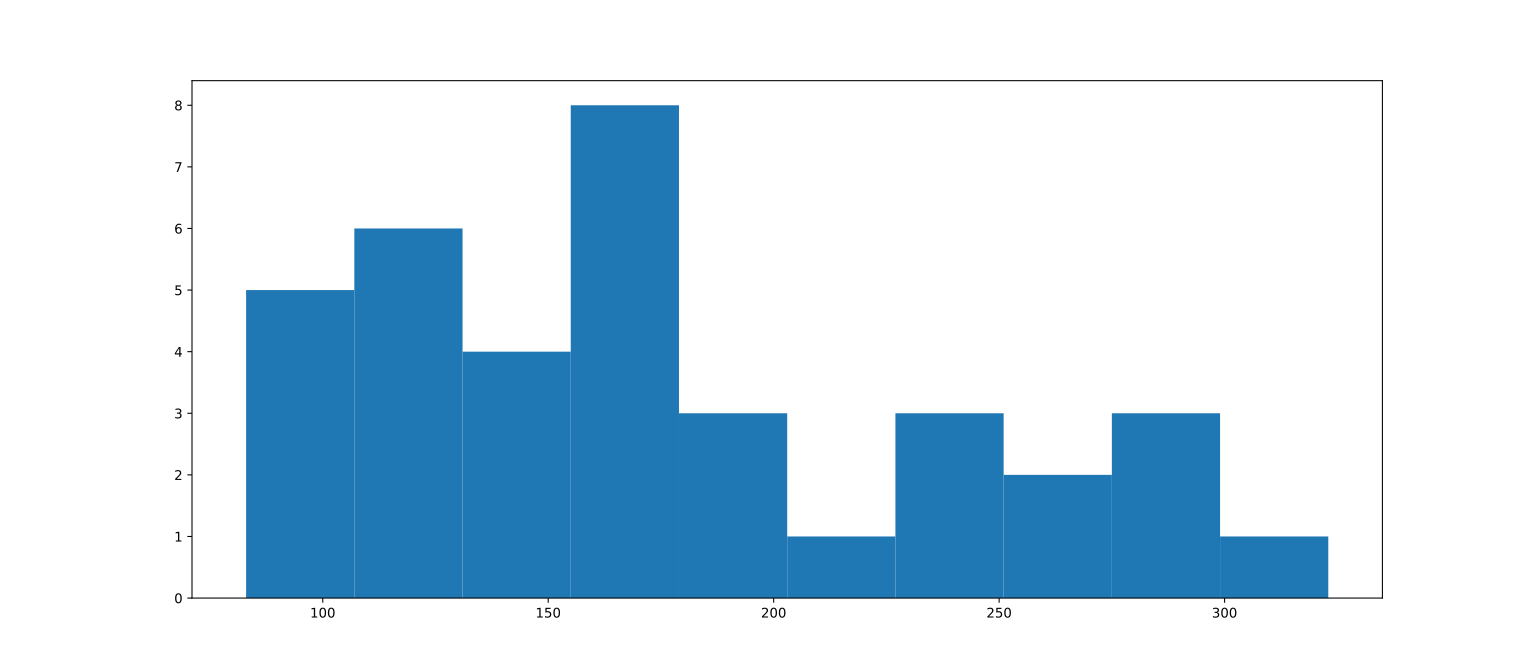 --- # Five-Number Summary * Standard quartiles + extreme values are useful to judge symmetry * Useful to compare transformations ``` python np.percentile(pm25, [0, 25, 50, 75, 100]) ``` ``` array([ 83. , 122.25, 162.5 , 225.75, 323. ]) ``` --- # Box-and-Whisker Plot ``` python plt.boxplot(np.log(pm25)) ``` ``` {'whiskers': [<matplotlib.lines.Line2D object at 0x1118bc1f0>, <matplotlib.lines.Line2D object at 0x1118bc490>], 'caps': [<matplotlib.lines.Line2D object at 0x1118bc730>, <matplotlib.lines.Line2D object at 0x1118bc9d0>], 'boxes': [<matplotlib.lines.Line2D object at 0x1118acf10>], 'medians': [<matplotlib.lines.Line2D object at 0x1118bcc70>], 'fliers': [<matplotlib.lines.Line2D object at 0x1118bcf10>], 'means': []} ``` ``` python plt.show() ``` 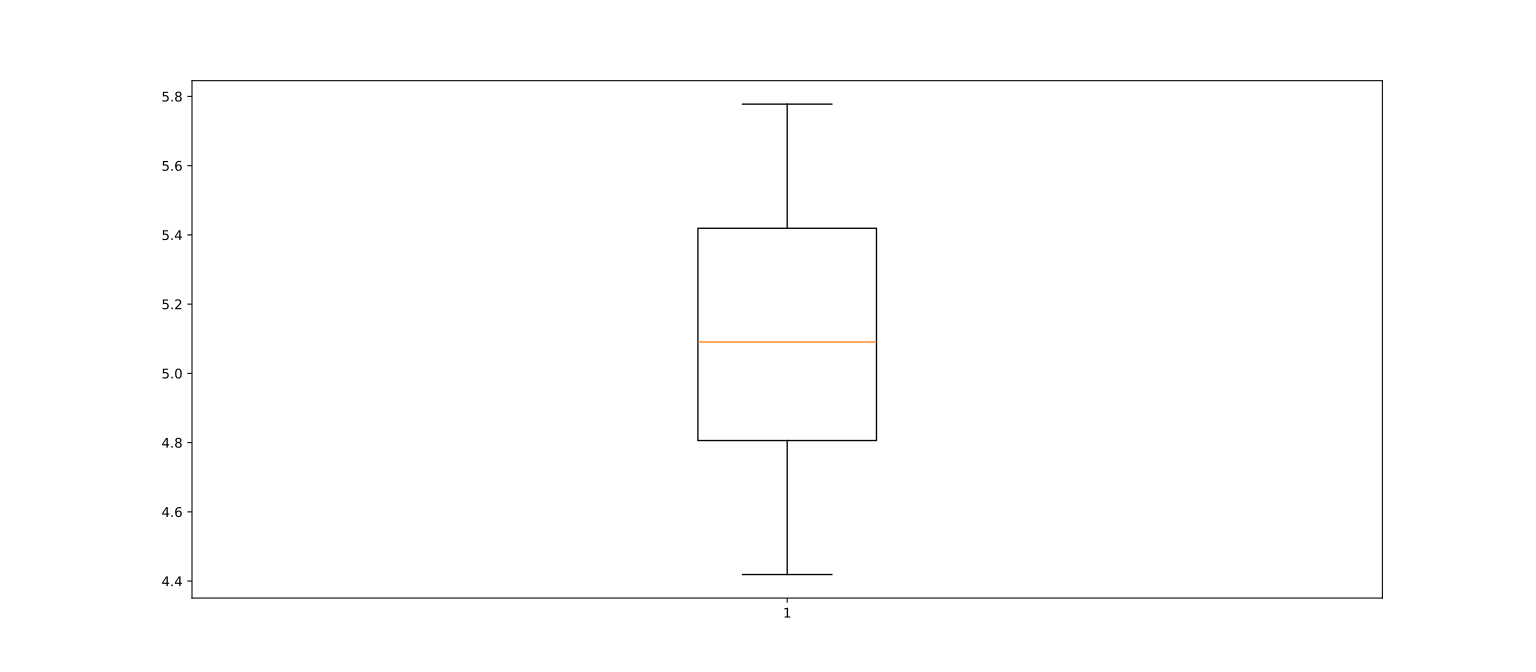 --- layout: true # Time Series Plots --- * We often plot observations against time (or the order in which they were obtained) * Helps to convey serial correlation or trend -- * The `plt.scatter()` function creates a scatterplot of two variables * To use it, we need a sequence of integers for the time variable --- * NumPy's `np.arange()` function generates sequences similar to the `seq()` function in R ``` python time = np.arange(0, 36) # creates 0, 1, 2, ... 35 plt.scatter(time, pm25) ``` 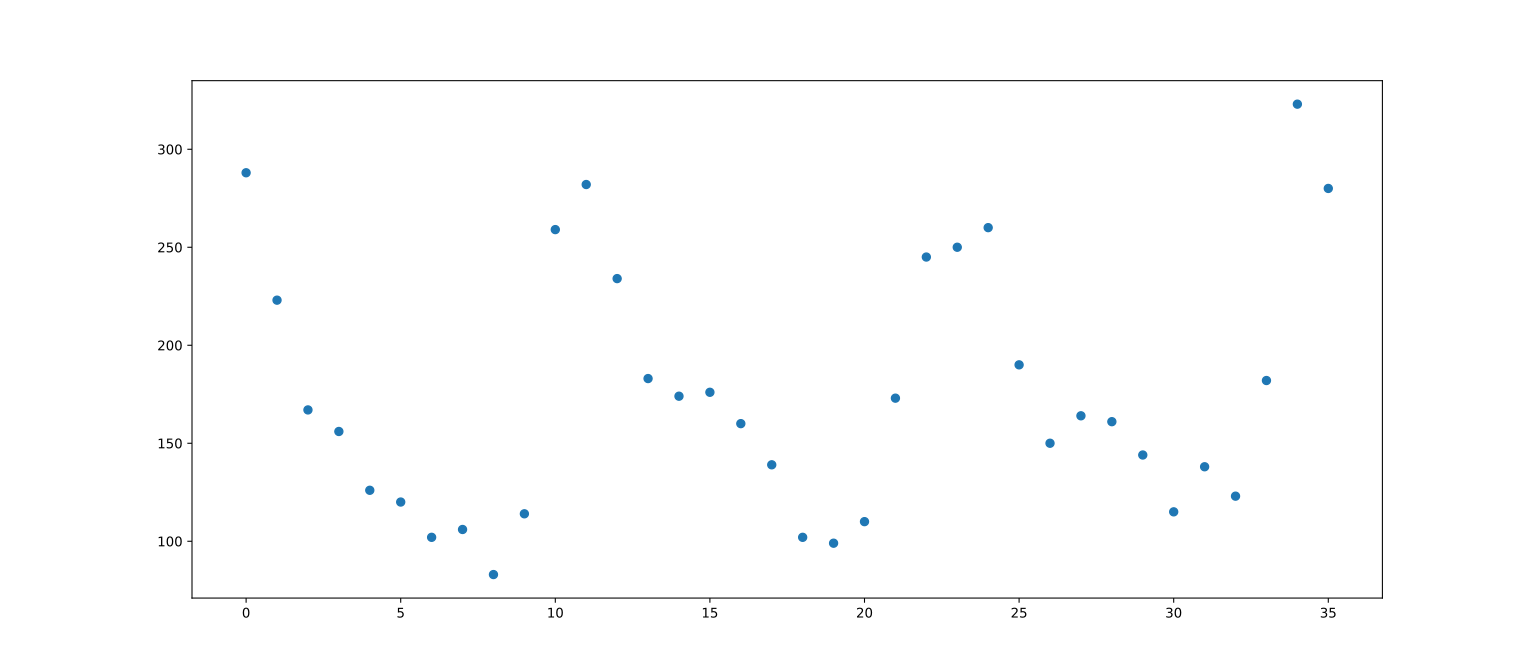 --- * To connect points by lines, use `plt.plot()` ``` python plt.plot(time, pm25) ``` 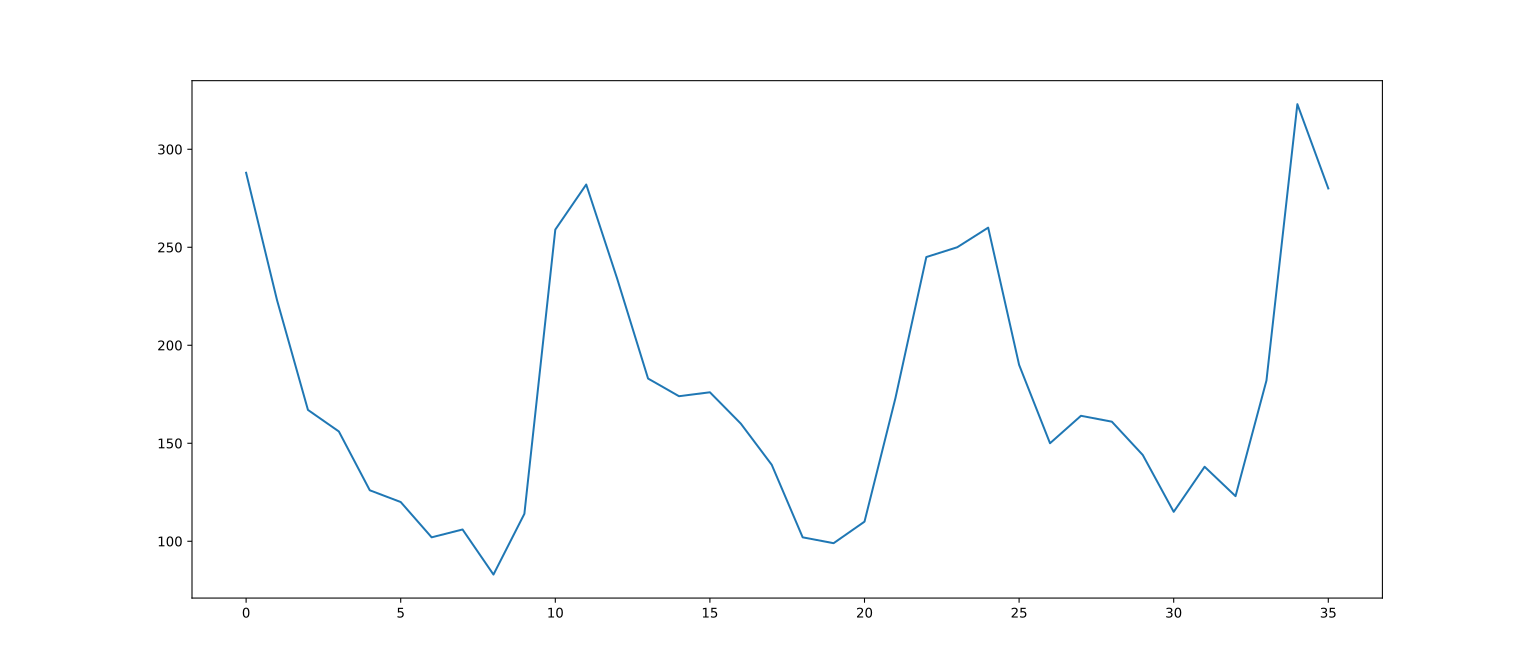 --- layout: true # Scatter plots --- * General scatter plots show points with coordinates given by two variables * Very useful for examining the relationship between two numerical variables -- * Recall: `higher_educ` from social indicators data * Additionally define the `adult_lit` variable to contain corresponding adult literacy (%). ``` python adult_lit = np.array([5, 2.5, 17.5, 2.5, 47.5, 13, 9, 7.5, 27.5, 13, 47.5, 19.3, 17.5, 10, 22.5, 33.5, 37.5, 68, 32.1, 17.5]) ``` --- * Scatter plot of `higher_educ` against `adult_lit` ``` python plt.scatter(adult_lit, higher_educ) ```  --- layout: true # Plotting Functions --- * Sometimes we are interested in plotting functions; e.g., plot $\sin(x)$ from $-\pi$ to $+\pi$ ``` python x_points = np.linspace(-np.pi, np.pi, 50) # equally spaced grid plt.plot(x_points, np.sin(x_points)) ```  --- * We can alse define a new function to plot ``` python def f(x): return 2 * x + 3 * (x ** 2) - (x ** 3) plt.plot(x_points, f(x_points)) ```  --- * Alternatively, we can use a Python `lambda` (R-like anonymous function). ``` python plt.plot(x_points, (lambda x: 2 * x + 3 * (x ** 2) - (x ** 3))(x_points)) ```  --- layout: true # Example: Loss Function --- * The mean and median can be viewed as solutions that minimize a _loss function_ * Sample mean of $X\sub{1}, X\sub{2}, \dotsc, X\sub{n}$: $$ \arg \min\sub{\theta} \sum\limits\sub{i=1}^n (X\sub{i} - \theta)^2 $$ * Sample median of $X\sub{1}, X\sub{2}, \dotsc, X\sub{n}$: $$ \arg \min\sub{\theta} \sum\limits\sub{i=1}^n \lvert X\sub{i} - \theta \rvert $$ --- * The mean and median can be viewed as solutions that minimize a _loss function_ * Sample mean of $X\sub{1}, X\sub{2}, \dotsc, X\sub{n}$: $$ \arg \min\sub{\theta} L\sub{1}(\theta) \ \text{ where } L\sub{1}(\theta) = \sum\limits\sub{i=1}^n (X\sub{i} - \theta)^2 $$ * Sample median of $X\sub{1}, X\sub{2}, \dotsc, X\sub{n}$: $$ \arg \min\sub{\theta} L\sub{2}(\theta) \ \text{ where } L\sub{2}(\theta) = \sum\limits\sub{i=1}^n \lvert X\sub{i} - \theta \rvert $$ * What do the function $L\sub{1}$ and $L\sub{2}$ look like? --- * How can we define $L\sub{1}$? -- ``` python def SSD0(theta): S = 0 n = len(higher_educ) for i in range(n): # for loop S = S + (higher_educ[i] - theta) ** 2 # indexing, scope return S # value returned by function ``` -- * Useful approach in general, but can also use NumPy vectorization ``` python def SSD(theta): dev = higher_educ - theta return np.sum(dev * dev) ``` --- * Use _list comprehension_ to compute and plot `SSD()` ``` python theta_vals = np.linspace(60, 65, 100) loss_vals = np.array([ SSD(t) for t in theta_vals]) plt.plot(theta_vals, loss_vals) ```  --- * The equivalent of `sapply()` is `map()` ``` python lvals = np.array(list(map(SSD, theta_vals))) plt.plot(theta_vals, lvals) ```  --- layout: false class: center middle # Generating and Modifying Data Generating systematic and random data, modifying existing data --- # Generating Random Data (Simulation) using NumPy * Uniform random variables: `np.random.uniform(low, high, size)` ``` python np.random.uniform(0, 1, 5) ``` ``` array([0.24159411, 0.49245547, 0.50461351, 0.83143955, 0.97428471]) ``` * Standard Normal random variables: `np.random.normal(loc, scale, size)` ``` python np.random.normal(0, 1, [2, 5]) # 2 x 5 matrix instead of vector ``` ``` array([[ 0.52852409, 0.62614261, -0.51856076, -0.83819038, 0.39376613], [ 0.33096804, 0.54777145, -2.36016235, 2.06401645, 0.18607367]]) ``` -- * R requires two function calls for this ``` r rnorm(10, mean = 0, sd = 1) |> array(dim = c(2, 5)) ``` ``` [,1] [,2] [,3] [,4] [,5] [1,] 0.7515837 0.59474 -1.065693 0.1727167 1.231893 [2,] 0.6559926 1.27446 -0.940663 0.6434955 1.619302 ``` --- layout: true # Generating Systematic Data --- * We can use ``np.arange()` or `np.linspace()` for equally spaced sequences ``` python np.arange(0, np.sqrt(10)) ``` ``` array([0., 1., 2., 3.]) ``` ``` python np.linspace(0, 1, 11) ``` ``` array([0. , 0.1, 0.2, 0.3, 0.4, 0.5, 0.6, 0.7, 0.8, 0.9, 1. ]) ``` --- * `np.repeat()` can generate sequences with specific patterns ``` python np.repeat([1, 2, 7], 2) # If pattern is a single number ``` ``` array([1, 1, 2, 2, 7, 7]) ``` ``` python np.repeat([1, 2, 7], repeats = [1, 2, 7]) # If pattern is a list ``` ``` array([1, 2, 2, 7, 7, 7, 7, 7, 7, 7]) ``` --- layout: true # Forming Subsets and Deleting Cases --- * NumPy also uses bracket indexing `[]` to select elements from a vector or list * An important difference with R is that **Python / NumPy uses 0-based indexing** -- * Define an array `x`: ``` python x = np.array([2, 4, 7, 7, 14, 37, 39]) x ``` ``` array([ 2, 4, 7, 7, 14, 37, 39]) ``` * To retrieve the 2nd element (index 1): ``` python x[1] ``` ``` np.int64(4) ``` -- To retrieve a group of elements (index 0 and 2): ``` python x[[0, 2]] ``` ``` array([2, 7]) ``` --- * Excluding elements using negative indices is not supported * A concise way to exclude element 2 (3rd element) ``` python np.delete(x, 2) ``` ``` array([ 2, 4, 7, 14, 37, 39]) ``` ``` python x ``` ``` array([ 2, 4, 7, 7, 14, 37, 39]) ``` --- * Logical indexing works similar to R * To select all elements of `x` that are greater than 5: ``` python x[x > 5] ``` ``` array([ 7, 7, 14, 37, 39]) ``` --- layout: false # Combining Several Lists * The NumPy equivalent of `c()` in R is `np.concatenate()` ``` python z1 = np.array([1, 2, 7]) z2 = np.array([15]) z3 = np.array([3, 4, 37, 43]) [z1, z2, z3] ``` ``` [array([1, 2, 7]), array([15]), array([ 3, 4, 37, 43])] ``` ``` python np.concatenate([z1, z2, z3]) ``` ``` array([ 1, 2, 7, 15, 3, 4, 37, 43]) ``` --- # Modifying Data: Replace values in existing vector * NumPy also uses subsetting combined with assignment * To change the `14` (the 5th element) in `x` to `11`: ``` python x ``` ``` array([ 2, 4, 7, 7, 14, 37, 39]) ``` ``` python x[4] = 11 x ``` ``` array([ 2, 4, 7, 7, 11, 37, 39]) ``` -- * To change elements 1 and 3 (index 0 and 2) to `15` and `16`: ``` python x[[0, 2]] = [15, 16] x ``` ``` array([15, 4, 16, 7, 11, 37, 39]) ``` --- layout: true # Reference versus copy --- * Unlike R, assigning a NumPy array to a variable creates only a reference, __not__ a full copy * For example, consider the following, which assigns `x` to a new variable `y`. ``` python y = x print(x) ``` ``` [15 4 16 7 11 37 39] ``` ``` python print(y) ``` ``` [15 4 16 7 11 37 39] ``` --- * Suppose now we modify `y` ``` python y[3] = 100 print(x) ``` ``` [ 15 4 16 100 11 37 39] ``` ``` python print(y) ``` ``` [ 15 4 16 100 11 37 39] ``` * Python does **not** copy implicitly in such situations --- * If required, copies must be made explicitly ``` python u = x.copy() # Explicit copy u[3] = 200 print(u) ``` ``` [ 15 4 16 200 11 37 39] ``` ``` python print(x) # unchanged ``` ``` [ 15 4 16 100 11 37 39] ``` --- layout: false class: center middle # Useful Features Interacting with Python --- # Getting Help * Online help is available for most Python functions using `help()` ```python help(np.median) ``` * Interactive documentation in Python has less features than that of R * Online documentation of Python libraries is usually very comprehensive --- # Listing and Undefining Variables * To find out which variables we have defined in the current session: ``` python dir() ``` ``` ['SSD', 'SSD0', '__annotations__', '__builtins__', '__doc__', '__loader__', '__name__', '__package__', '__spec__', 'adult_lit', 'f', 'higher_educ', 'loss_vals', 'lvals', 'np', 'plt', 'pm25', 'r', 'theta_vals', 'time', 'u', 'x', 'x_points', 'y', 'z1', 'z2', 'z3'] ``` * To remove a variable to free up memory, use the `del` keyword ``` python del theta_vals del loss_vals ``` --- # Saving Your Work * NumPy provides R-like mechanisms to save and load variables * To save NumPy array variables for later use: ``` python higher_educ ``` ``` array([ 56, 12, 4, 5, 63, 49, 34, 9, 14, 165, 69, 220, 83, 4, 5, 21, 4, 251, 166, 18]) ``` ``` python np.save("examples.npy", higher_educ) ``` * To load data saved in this binary format (`.npy`): ``` python data = np.load("examples.npy") data ``` ``` array([ 56, 12, 4, 5, 63, 49, 34, 9, 14, 165, 69, 220, 83, 4, 5, 21, 4, 251, 166, 18]) ``` --- layout: true # Data Frames and Data Import --- * Small datasets can be typed in at the Python console to illustrate basic usage * Real world datasets are too large for this to be feasible * This typically uses the **Pandas** library, which provides support for data frames ``` python import pandas as pd ``` --- .scrollable500[ ``` python soc_indic = pd.DataFrame({'LogHiEd': np.log(higher_educ), 'SqrtAdLit': np.sqrt(adult_lit)}) soc_indic ``` ``` LogHiEd SqrtAdLit 0 4.025352 2.236068 1 2.484907 1.581139 2 1.386294 4.183300 3 1.609438 1.581139 4 4.143135 6.892024 5 3.891820 3.605551 6 3.526361 3.000000 7 2.197225 2.738613 8 2.639057 5.244044 9 5.105945 3.605551 10 4.234107 6.892024 11 5.393628 4.393177 12 4.418841 4.183300 13 1.386294 3.162278 14 1.609438 4.743416 15 3.044522 5.787918 16 1.386294 6.123724 17 5.525453 8.246211 18 5.111988 5.665686 19 2.890372 4.183300 ``` ] --- * Individual "columns" can be extracted using the `.` extractor or `[name]` indexing ``` python soc_indic.LogHiEd.to_numpy() ``` ``` array([4.02535169, 2.48490665, 1.38629436, 1.60943791, 4.14313473, 3.8918203 , 3.52636052, 2.19722458, 2.63905733, 5.10594547, 4.2341065 , 5.39362755, 4.41884061, 1.38629436, 1.60943791, 3.04452244, 1.38629436, 5.52545294, 5.11198779, 2.89037176]) ``` ``` python np.mean(soc_indic['LogHiEd'].to_numpy()) ``` ``` np.float64(3.3005234880287766) ``` --- * Can also be imported from file ``` python URL = "https://deepayan.github.io/BSDS/2026-01-DARP/slides/data/social-indicators-1964.csv" social_indicators = pd.read_csv(URL, comment = "#") social_indicators ``` ``` Country GNP per Capita Percent Urban Percent Adult Literacy Higher Ed per 100000 Inhabitants per Physician Radios per 1000 0 Nepal 45 4.4 5.0 56.0 72000.0 NaN 1 Afghanistan 50 7.5 2.5 12.0 41000.0 1.7 2 Laos 50 4.0 17.5 4.0 100000.0 8.0 3 Togo 50 4.5 7.5 NaN 58000.0 4.3 4 Ethiopia 55 1.7 2.5 5.0 117000.0 4.5 .. ... ... ... ... ... ... ... 102 Sweden 1380 40.8 98.5 401.0 1089.0 378.0 103 Luxembourg 1388 30.6 96.5 36.0 910.0 319.0 104 Switzerland 1428 29.9 98.5 398.0 765.0 272.0 105 Canada 1947 39.4 97.5 645.0 900.0 451.0 106 United States 2577 52.0 98.0 1983.0 780.0 948.0 [107 rows x 7 columns] ``` --- layout: true # Plotting data in data frames --- * Pandas plot interface (less flexible) ``` python social_indicators.plot.scatter(x = 'Higher Ed per 100000', y = 'Percent Adult Literacy') ```  --- * Use `matplotlib.pyplot` directly as `plt` ``` python plt.scatter(x = np.log(social_indicators['Higher Ed per 100000']), y = np.sqrt(social_indicators['Percent Adult Literacy'])) ```  --- layout: false class: center middle # Questions?